
What Is a Digital Business Card? (Complete 2026 Guide)
Discover what digital business cards are, how they work, and why 88% of professionals prefer them over paper.
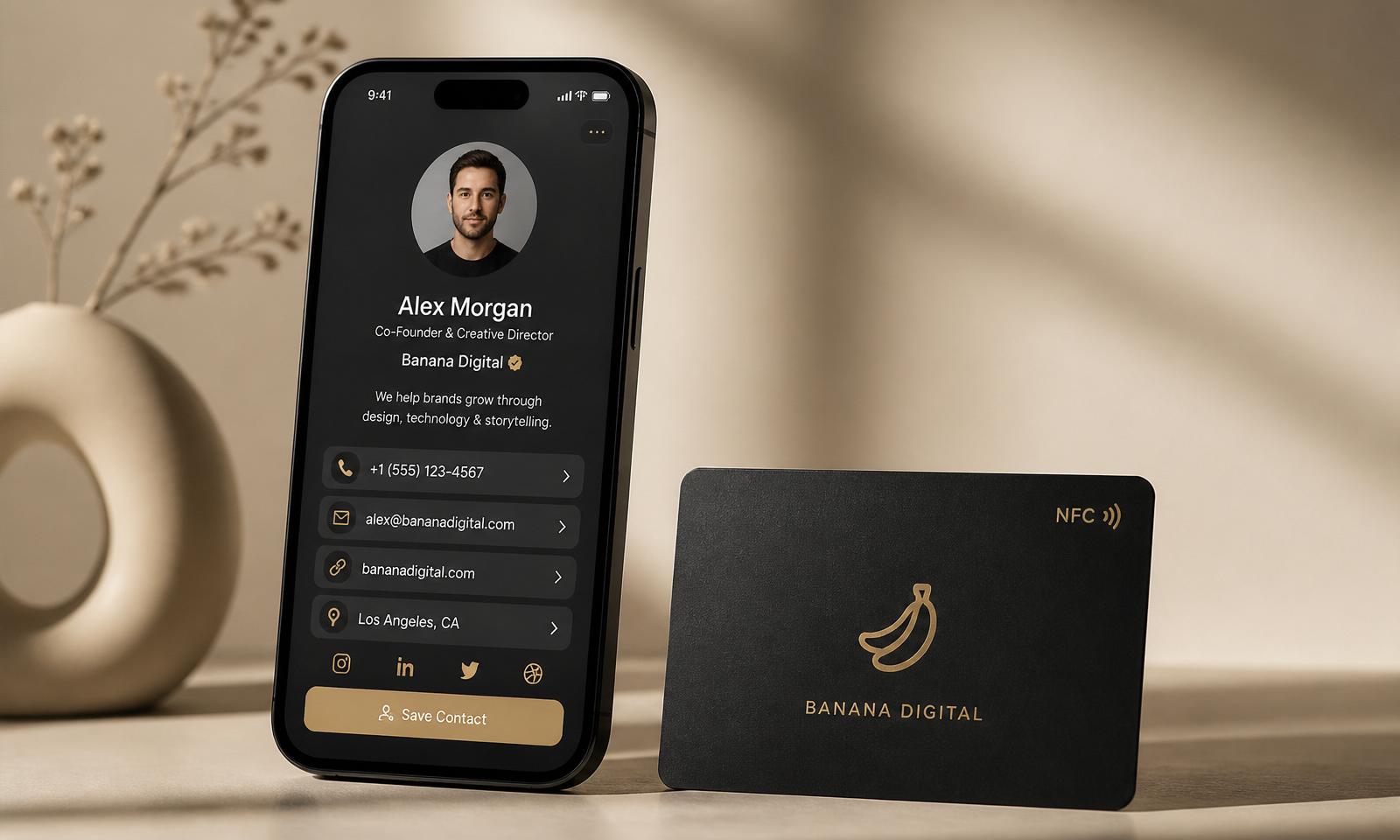
A digital business card is a modern replacement for the paper card you used to hand out at meetings, conferences, and coffee chats. Instead of a printed rectangle that ends up in a drawer, your contact details, socials, portfolio, calendar and payment links live on a mobile-first profile that anyone can save with a single tap or scan — no app required.
In 2026, 88% of professionals say they prefer digital business cards to paper, and the reason is simple: paper cards are lost, mistyped, or thrown away within a week. Digital cards land straight in the other person's phone, always up to date, always trackable.
This guide covers everything you need to know: how digital cards work, the different types, the benefits vs. paper, how to choose one, and how banana.cards turns a business card into a full networking platform.
How a digital business card actually works
Every digital business card is a web profile hosted at a short URL — for example banana.cards/alex. That profile contains everything you'd normally cram onto paper (name, title, phone, email, company), plus everything you couldn't (video, portfolio, booking calendar, WhatsApp, LinkedIn, Google reviews, Stripe payment link, and more).
You share that profile in one of four ways:
- NFC tap — the person taps their phone to your NFC card and your profile opens instantly. No app, no download, no typing.
- QR code — they scan a QR displayed on your phone, wallet card, or badge.
- Direct link — you paste your
banana.cards/youURL into a message, email signature, or bio. - Apple Wallet / Google Wallet — your card lives in the same wallet as your boarding pass.
The person receiving it doesn't need the same app you're using. That's the whole point.
The three types of digital business cards
Not every "digital card" is the same. Here's how to think about them:
1. Virtual-only cards (free)
A hosted profile with a link and a QR — no physical object. Great for freelancers, students, and anyone testing the waters. Every banana.cards account starts with one for free.
2. NFC business cards (physical + digital)
A premium card — metal, bamboo, PVC, or 24kt gold plated — with an embedded NFC chip. You keep the ritual of handing something over, but the receiver gets a live digital profile. This is what most professionals settle on.
Explore the range on our shop: Metal, Bamboo, Black PVC, White PVC, and 24kt Gold.
3. Review cards
A specialised NFC card that instantly opens your Google review page when tapped. Restaurants, salons, dentists, and service businesses use these to turn happy customers into 5-star reviews without asking twice. See the Google Review card.
Digital vs. paper: the honest comparison
| Paper card | Digital card (banana.cards) | |
|---|---|---|
| Cost per contact | Reprint every time details change | One card, updated forever |
| Contact accuracy | 60–70% typed correctly | 100% — saved as-is |
| Portfolio, video, calendar | Impossible | Included |
| Analytics (who tapped, when) | None | Full dashboard |
| Sustainability | ~7 billion cards printed/year, most trashed | One card, decades of use |
| Follow-up | Manual, easy to forget | Auto-CRM entry, AI enrichment |
Why 88% of professionals switched
Paper works exactly once — the moment of the handshake. Digital works every day after. Some of the reasons professionals cite most often:
- Update once, everywhere. Change your job title and every card in the wild updates instantly.
- Never run out. No "sorry, I gave my last one away" moments.
- Save the contact for them. One tap adds you to their phone with every field filled.
- Actually measure it. See how many people tapped your card at an event, which links they clicked, and which leads went cold.
- Look premium. A matte black metal card with your logo says more than glossy cardstock ever could.
Beyond the card: what banana.cards adds
A card is just the entry point. On banana.cards, every tap flows into a full business operating system designed around how modern professionals actually work:
- CRM — every contact you meet, automatically saved and enriched.
- AI enrichment — pull LinkedIn, company info, and mutual connections for every lead.
- Bookings — let people book you straight from your card.
- Contracts — send and e-sign proposals from the same profile.
- Email — write and send follow-ups powered by AI.
- QR codes — dynamic QR codes for menus, events, and campaigns.
- Reviews — automate Google review requests.
- Automations — trigger a welcome email, tag a lead, or add to a pipeline the second a card is tapped.
See the full picture on the platform overview.
Who uses digital business cards in 2026
Digital cards are no longer a "tech" thing — they're a professional standard.
- Founders and startups — one card that shows deck, calendar, and product demo.
- Sales teams — every rep captures leads directly into the shared CRM.
- Real estate agents — tap-to-listing, tap-to-schedule-viewing.
- Enterprise teams — centralised branding, provisioning, SSO, analytics across hundreds of employees.
Full breakdown by role: solutions.
How to choose the right digital business card
A quick decision framework:
- Just starting? Grab a free profile — no card required, no credit card, live in 60 seconds.
- Meet people in person regularly? Add a physical NFC card. Metal is the classic; bamboo is the sustainable pick; 24kt gold is for signalling status.
- Run a service business? Add a Google Review card at the counter and watch reviews climb.
- Work in a team? Skip individual cards — go straight to team plans for centralised control and analytics.
Frequently asked questions
Do people need an app to save my card? No. Both NFC and QR open a normal web page. Any modern iPhone or Android saves the contact with one tap.
Does NFC work on iPhone? Yes — every iPhone from the iPhone XS (2018) onwards reads NFC business cards natively, no app or setting required.
What if I change jobs? Log in, edit your profile once, and every card you've ever handed out is up to date. This is the biggest single reason people switch from paper.
Is it secure? Your profile only shows what you choose to share. You can turn fields on/off, hide from search, and revoke access to shared profiles at any time. Read more on security.
How much does it cost? The digital profile is free forever. Physical NFC cards start at a one-time cost, no subscription required. Team and pro features are available on paid plans.
Start with a free digital business card
The fastest way to understand digital business cards is to make one. It takes about 60 seconds — claim your banana.cards profile and pick a card design when you're ready.
If you already know you want the physical experience, browse the full card collection — every card ships with a free digital profile and lifetime updates included.